Disclaimer
All screenshots in the article were taken in the Dutch version of Nmbrs Accounting.
Within a Nmbrs Accounting domain, you can manage various settings. Some settings are purely personal and do not affect the software's operation. Other settings directly determine how Nmbrs Accounting functions for administration.
ATTENTION!
Exactly which settings you see and can change depends on your chosen bundle (and any extra features) and your user role.
Access to Settings
All settings are centrally organized on one clear page.
Click on the Settings icon in the navigation bar, and the settings screen is opened:
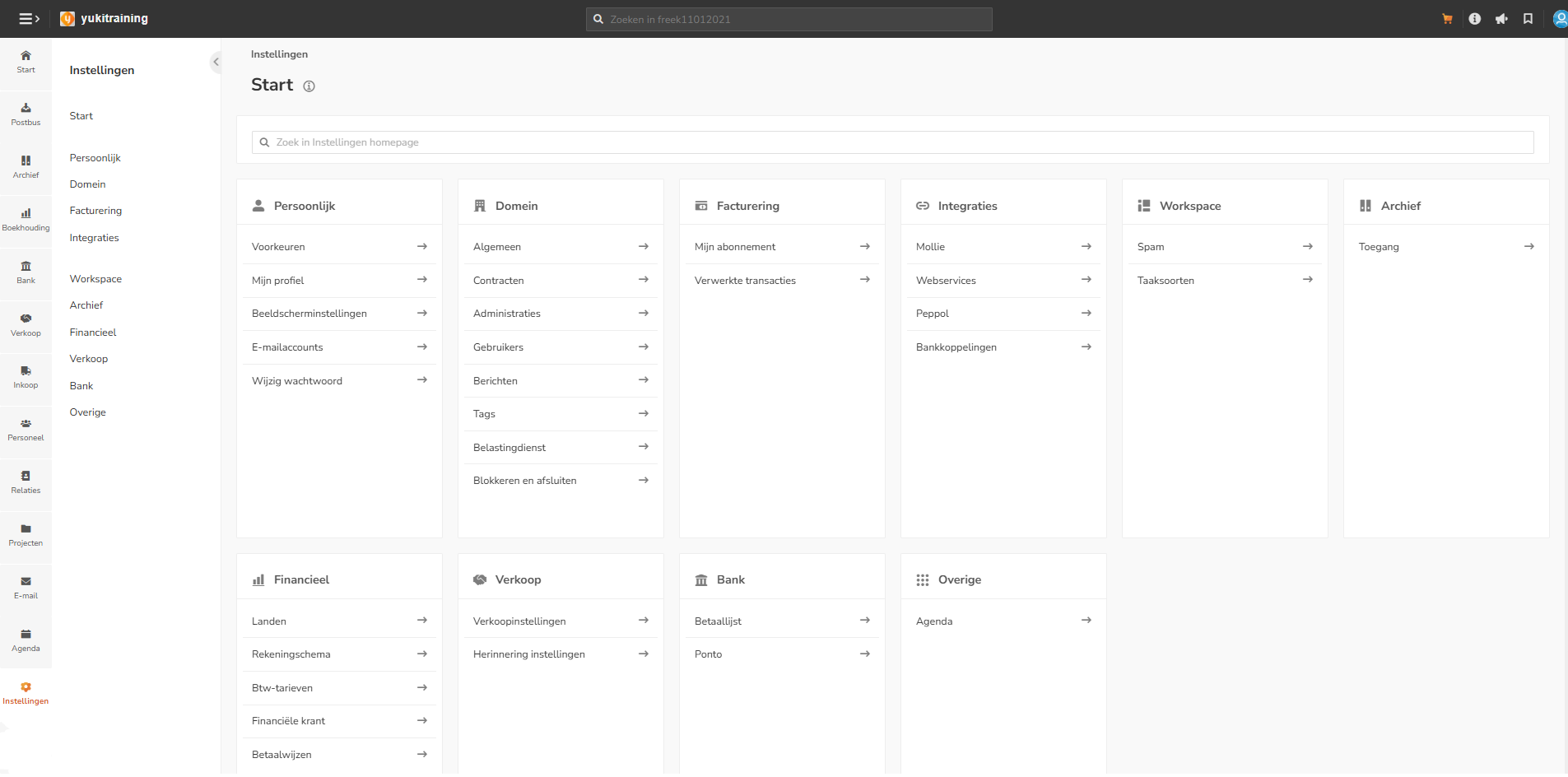
The screenshot above shows the settings that can be configured by a user with the 'Management' role in the domain.
Categories overview
Below you will find descriptions per category, directly subdivided into settings that do or do not affect the operation of Nmbrs Accounting.
Personal
These settings are for you only and do not affect the operation of Nmbrs Accounting:
- Preferences
Customize your personal settings for your desktop, the Archive, your email, and more. - My profile
View and edit your own contact card and contact details. - Display settings
Personalize the appearance of your navigation and menu bars. - Email accounts
Manage the overview of your linked email accounts. - Change password
Change your password or the email address you use to log in here.
Domain
All these settings affect the operation of Nmbrs Accounting:
- General
Basic domain details, such as the owner and the set language. - Contracts
Manage your Nmbrs Accounting contract; here you can cancel or reactivate the administration. - Companies
An overview of all companies (administrations) within this domain. - Users
Manage access and basic rights per user. Assign specific roles to grant additional rights. - Messages
Manage questions regarding administration, VAT returns, or outstanding points of attention. - Tags (does not affect the operation)
Manage active and inactive labels to internally mark documents. - Tax authorities
Set whether the VAT return must first be approved by the entrepreneur (customer) before it is sent to the tax authorities. - Block and close
Overview of administrations that are blocked or permanently closed.
Billing
These settings do not affect the operation of Nmbrs Accounting:
- My subscription
Insight into your current bundle, usage (number of processed invoices), payment method, and invoice history of your Nmbrs Accounting subscription. - Processed transactions
A historical overview of all transactions processed in Nmbrs Accounting during a specific period.
Integrations
All these settings affect the operation of Nmbrs Accounting:
- Mollie
Connect your Mollie account to add an online payment link to your sales invoices. This allows payments, bank statements, and transactions from Mollie to be automatically processed in Nmbrs Accounting. - Web services
Configure data exchange and connections with external applications or services. - Peppol
Register or deregister administrations for the secure Peppol network to send and receive e-invoices securely and fully automatically. - Bank links
Overview of active accounting links. Here you can (after activation by the accountant) set up a Rabobank accounting link, for example, to retrieve transactions automatically or manually.
Workspace
These settings do not affect the operation of Nmbrs Accounting:
- Spam settings
Manage the blacklist and whitelist for email addresses that submit documents via Digital Mail. - Task type
Define different types of tasks (actions, questions, or assignments) that you can link to documents for users.
Archive
This setting does not affect the operation of Nmbrs Accounting:
- Access
Determine which users have access to the standard documents in the gray folders (the top shelf of the Archive).
Financial
All these settings affect the operation of Nmbrs Accounting:
- Countries
Manage which countries are active or inactive within the administration. - Chart of accounts
Activate or deactivate specific GL accounts. - VAT rates
Manage active and inactive VAT rates. - Financial newspaper (does not affect the operation)
Manage the list of users subscribed to the financial newspaper. - Payment methods
Create your own payment methods for processing sales invoices.
Sales
All these settings affect the operation of Nmbrs Accounting:
- Sales settings
Set up the basics for sales invoices, quoteations, and contracts, including layouts and delivery methods. - Reminder settings
Set up the reminder and demand for payment service. Manage manual/automatic follow-up, layouts, and blocked contacts.
Bank
All these settings affect the operation of Nmbrs Accounting:
- Payment list settings
Secure the payment list so that documents must be approved before they can be paid. Also set here whether payment discounts are allowed. - Ponto PSD2 links
Securely and reliably link bank accounts from a wide range of banks via PSD2 and GDPR regulations.
Other
This setting does not affect the operation of Nmbrs Accounting:
- Calendar
Adjust your personal preferences for the display of the Nmbrs Accounting Calendar.
Was this article helpful?
That’s Great!
Thank you for your feedback
Sorry! We couldn't be helpful
Thank you for your feedback
Feedback sent
We appreciate your effort and will try to fix the article