Disclaimer
All screenshots in the article were taken in the Dutch version of Nmbrs Accounting.
Which settings you can specify in a domain depends on the selected bundle (and any additional features added) and the role(s) you have as a user in the domain.
In Nmbrs Accounting you can set the following bank settings:
- Payment list
Here you can configure payment list security so that documents due for payment require approval before they appear in the payment list. You can also specify whether or not discounts apply when paying for documents. - Ponto
Ponto enables bank accounts from more than thirty banks to be linked to Nmbrs Accounting in a secure and reliable manner, in accordance with PSD2 and GDPR regulations. - Purchase invoice settings
Disable mandatory bank account entry when processing purchase invoices with payment method 'Electronic transfer'.
Ponto
Ponto enables bank accounts from more than 30 banks to be securely and reliably linked to Nmbrs Accounting according to PSD2 and GDPR regulations.
For more information about Ponto see https://myponto.com/en/products/account-information-service/.
Security and Privacy
For more information about Ponto's security and privacy see Ponto Privacy notice.
How does it work?
Once a current account is linked to Ponto, all relevant bank transactions (including opening and closing balances) are automatically added to your administration daily.
Immediately after linking, the day's transactions are automatically retrieved. After that, bank transactions will be retrieved every six hours through automatic bank account synchronization.
Restrictions and conditions
- It is not possible to link savings accounts with Ponto.
- Only Dutch, Belgian, and Spanish accounts can be linked via Ponto.
- Bank accounts must be linked one at a time from Nmbrs Accounting. Start with one bank account until the linking is complete before linking the next.
Costs
For each bank account authorized in Ponto (granted access to Nmbrs Accounting), a monthly fee of €1.00 will be charged.
ATTENTION!
Simultaneously linking a bank account to Ponto and one of the four accounting links (Rabobank, ABN AMRO, ING, or Knab) can result in duplicate transactions in your administraion.
The accounting link in question must be terminated.
When you try to link a bank account to Ponto that's already connected via the ABN AMRO, ING, Rabobank, or Knab accounting link, the following message appears on the screen (in this example, for an ING account):
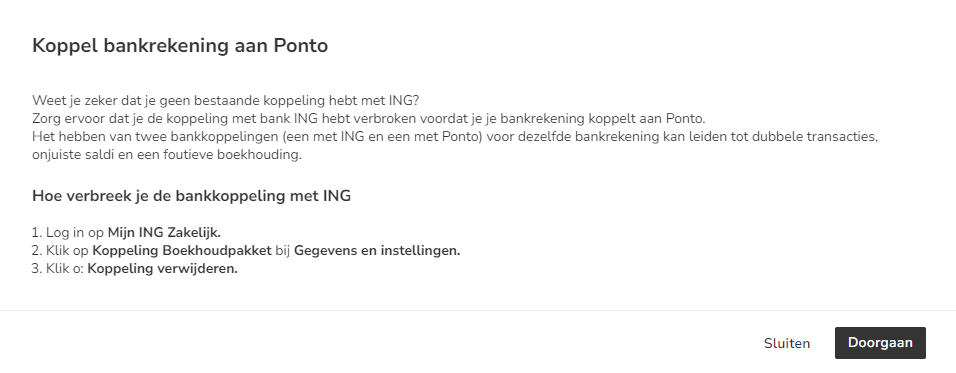
Follow the on-screen instructions to disconnect the relevant accounting link.
Supported banks for linking via Ponto
We recommend using the standard accounting link for ABM AMRO, Rabobank, ING, and Knab because, unlike the Ponto link, it only needs to be authorized once and is more stable.
For a detailed description of these accounting integrations, see Links.
Banks whose payment accounts can be linked via Ponto:
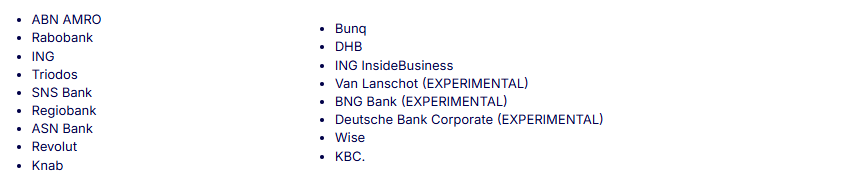
For a comprehensive list of banks whose checking accounts can be linked to Ponto, see https://www.isabel.eu/en/banks.
ATTENTION!
When 'EXPERIMENTAL' is shown after a bank, it means that Ponto does not currently have sufficient information to guarantee that the link will work properly.
Access to Ponto settings
To access:
- click on the Settings icon in the navigation bar
- then, in the now-opened screen, in the Bank section click on Ponto
Prepare to use Ponto
To enable the use of the Ponto PSD2 link, a user with the 'Back office' role in the domain or the 'Management' role must have arranged a number of things:
Back office
- Activate Ponto in the domain
- if necessary, remind entrepreneur of bank accounts to be linked
- if necessary, remind entrepreneur of linked bank accounts to be reauthorized
Entrepreneur
- if required, request activation of Ponto
- link one or more bank accounts to Ponto
- if necessary, reauthorize linked bank account
Every 6 months the authorization of a linked bank account in Ponto must be renewed.
Back office and Entrepreneur
- if necessary, manually retrieve transactions (from the past) in Nmbrs Accounting
Past bank transactions can be retrieved up to 180 days back.
Was this article helpful?
That’s Great!
Thank you for your feedback
Sorry! We couldn't be helpful
Thank you for your feedback
Feedback sent
We appreciate your effort and will try to fix the article