Disclaimer
All screenshots in the article were taken in the Dutch version of Nmbrs Accounting.
Which settings you can specify in a domain depends on the selected bundle (and any additional features added) and the role(s) you have as a user in the domain.
In Nmbrs Accounting, you can set the following domain settings:
- General
General information such as the owner and language of the domain, among others. - Contracts
View contract details, add or remove features to contract, cancel or reactivate contract. - Companies
All administrations included in this domain, create new administration and set up Fiscal unity if applicable. - Users
All users with access to this domain, grant or deny additional user access, delete user, assign role(s) to additional user, assign ‘Back office’ role to user if feature ‘Self-accounting’ is activated. - Messages
Which user per administration will receive messages from Nmbrs Accounting about VAT returns, points of interest, pay slips if applicable, and Peppol. - Tags
Put a “label” (tag) on specific data in the domain for easier retrieval.. - Tax authorities
Whether or not required approval of VAT return by entrepreneur before sending VAT return to tax authorities. - Block and close
Blocking and/or closing administration for audit or year-end purposes.
Contracts (domain settings)
The settings of your contract determine, among other things, the functionalities currently available for your domain in Nmbrs Accounting. The contract of one or more administrations may also be terminated or reactivated in a domain.
Permissions and roles
Viewing contract data is a privacy-sensitive matter. Therefore, only the following roles are authorized to view the contract:
- Domain qwner (must have the 'Management' role)
- Management
- Financial administration
- External accountant
- Back office.
Access to Contracts (domain settings0
To access:
- click on the Settings icon in the navigation bar
then, in the now-opened screen, in the Domain section click on Contracts.
Contract details overview
The screen with the contract details of the domain is always opened in the Active contracts view.
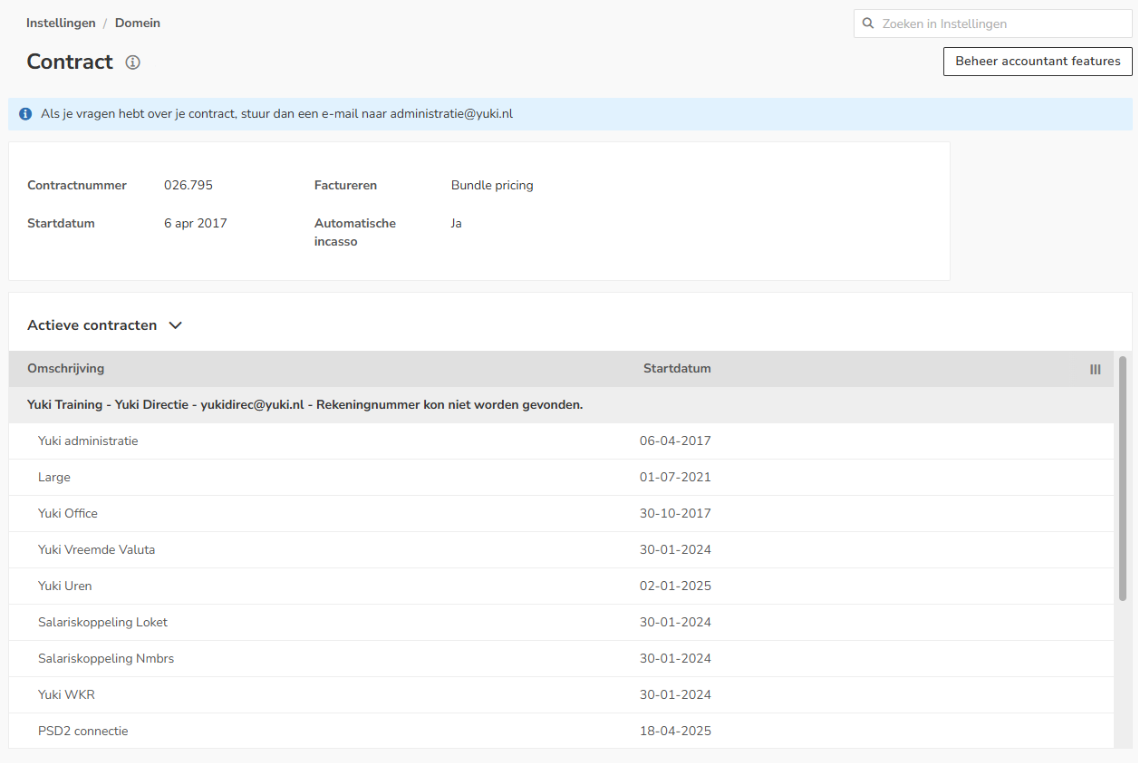
In this screen the following contract details are shown:
- contract number
- start date
- invoicing
To whom is the invoice addressed, email address for the invoice, direct debit details - active contracts / inactive contracts
Per contract, the following details are shown:- the administration name
- the addressee of the invoice (contact person of administration)
- the email address to which the invoice is sent (email address of contact person)
- the bank account number to be used for billing
- the chosen bundle
- any additional features such as Foreign currency, Hour registration, etc.
Views
You can also indicate in this screen that one of the following views should be shown:
- Inactive contracts (if applicable the option to reactivate contract) (only possible for owner of domain with the 'Management' role)
These are contracts whose contract end date has expired.
- Future contracts
These are contracts for which the start date of the contract has not yet been reached.

AVAILABLE USER ACTIONS
From this overview, a user can:
- add or remove features to the contract
- (see article View contract details)
- view the company profile
- cancel or reactivate the contract of an administration
(see article Cancel or reactivate contract for administration).
View company profile
To view the conpany profile:
- hover your mouse over the relevant company's line
- click on the button with the three dots
- then select the View company profile menu option from the dropdown menu.

The company profile is now opened.
Was this article helpful?
That’s Great!
Thank you for your feedback
Sorry! We couldn't be helpful
Thank you for your feedback
Feedback sent
We appreciate your effort and will try to fix the article