Disclaimer
All screenshots in the article were taken in the Dutch version of Nmbrs Accounting.
Nmbrs Accounting's service aims to keep all documents and data online in the Nmbrs Accounting environment and easily accessible. However, it can sometimes be convenient to take certain data or documents out of the Nmbrs Accounting environment again. This is done by exporting files. In Nmbrs Accounting, you can make use of export options at the portal, domain and administration levels.
Export options in portal
- Download tasks to be performed (CSV) via Workflow, Tasks
- Download VAT returns (CSV) via Workflow, VAT returns
- Download processed transactions (CSV) via Management, Reports, Transactions report
- Download UBL invoices (CSV) via Management, UBL
Permissions and roles
- Export data from the portal
Allowed for:
Only users with a Back Office role in the portal. - Download transaction report
Allowed for:
Only users with the Portal Administrator role.
Export basic administration data
You can start the following major data exports from an administration:
- Export contacts (Contacts / CRM)
Intended to import your contact data into external systems such as Microsoft Outlook, smartphones, or other Nmbrs Accounting domains.
ATTENTION!
Nmbrs Accounting does not support live synchronization with these external systems. - Export financial transactions (Financials)
This allows you to export financial transactions per general ledger card (often at the end of a financial year) for verification by an accountant. This is usually done in the form of an XAF file (Auditfile). - Export statements (Bank)
This allows you to export all transactions from your cash statements, bank statements, credit cards, and electronic statements in one go. - Export documents (Archive)
This allows you to download (part of) your archive to your hard drive as a backup or upon contract termination.
How does the Archive export work?
Nmbrs Accounting bundles the selected documents into a ZIP file. Due to the size, this happens in the background. Within 24 hours, you will receive an email with a download link. Please allow for a longer download time for large archives.
Permissions and roles
- Export contacts, financial transactions, and statements
Allowed for:
Users with the Back office role (within the domain) or theManagement, Financial Administration, or External Accountant roles. - Export documents from the Archive
- Management: Can export all documents from the Archive.
- Back office (in the domain): Can only export documents from the financial folders (the gray folders).
Exception for the Minimal bundle
In a domain with the Minimal bundle, only a user with the Back Office role (in the domain) has the right to export financial transactions.
Export/download overviews by functionality
In almost every Nmbrs Accounting screen where you can download overviews, you will find one of the following buttons/icons in the top right::
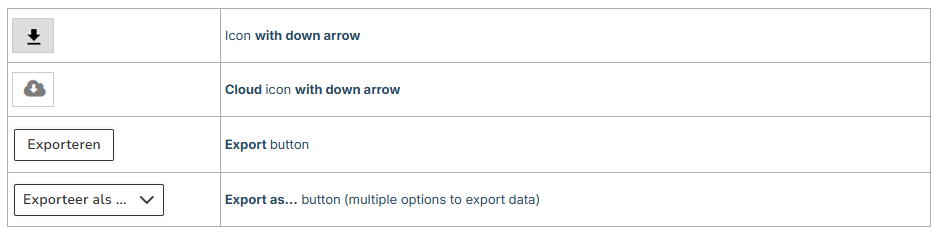
Below you will find an overview of all downloadable overviews by functionality and the corresponding file type:
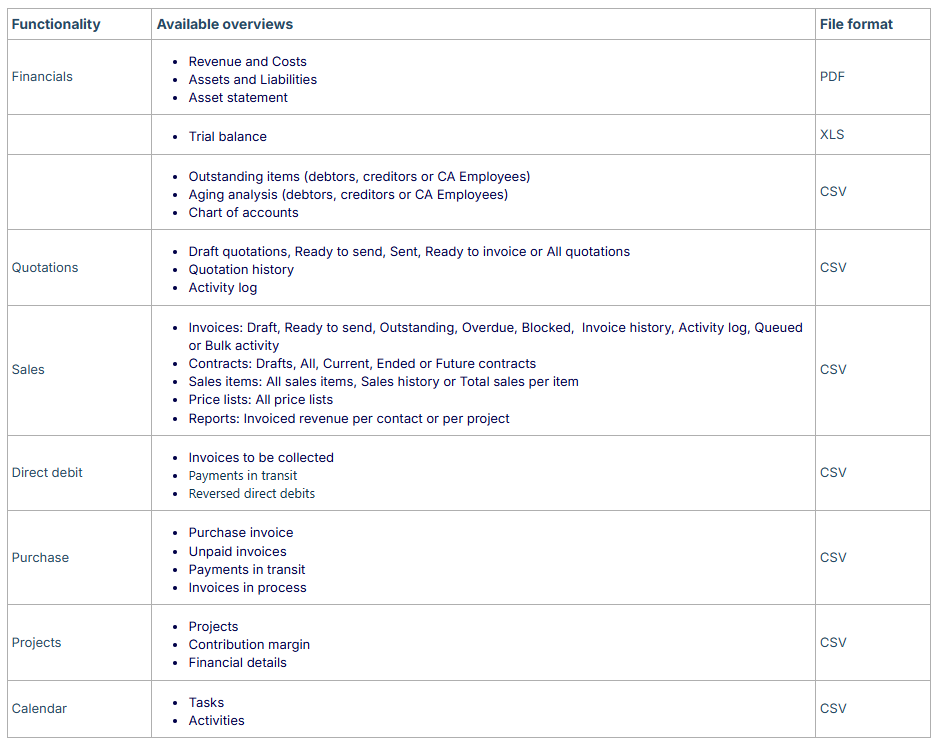
Permissions and roles
The reports that a user can export or download depend on your plan, your user permissions within a domain, and any additional features added to a domain.
Was this article helpful?
That’s Great!
Thank you for your feedback
Sorry! We couldn't be helpful
Thank you for your feedback
Feedback sent
We appreciate your effort and will try to fix the article