Disclaimer
All screenshots in the article were taken in the Dutch version of Nmbrs Accounting.
When starting a new administration, Nmbrs Accounting offers the possibility to manually retrieve, if necessary, all bank transactions that have taken place before the realization of the Rabobank accounting link.
The bank transactions can thus be retrieved up to 12 months back.
Permissions and roles
'Management' role
Only a user with the 'Management' role within the domain has full rights to:
- set up the accounting link
- change or stop the accounting link
- view an overview of established accounting links
- manually import transactions via the accounting link.
'Back office' role
A user with a 'Backoffice' role has more limited rights and can:
- view an overview of established accounting links
- manually import transactions via the accounting link.
To manually iomport bank transactions:
- click on the Settings icon in the navigation bar
- in the now-opened screen, in the Integrations section click on Bank Connections
- in the now-opened screen, click on > in front of the relevant bank account.
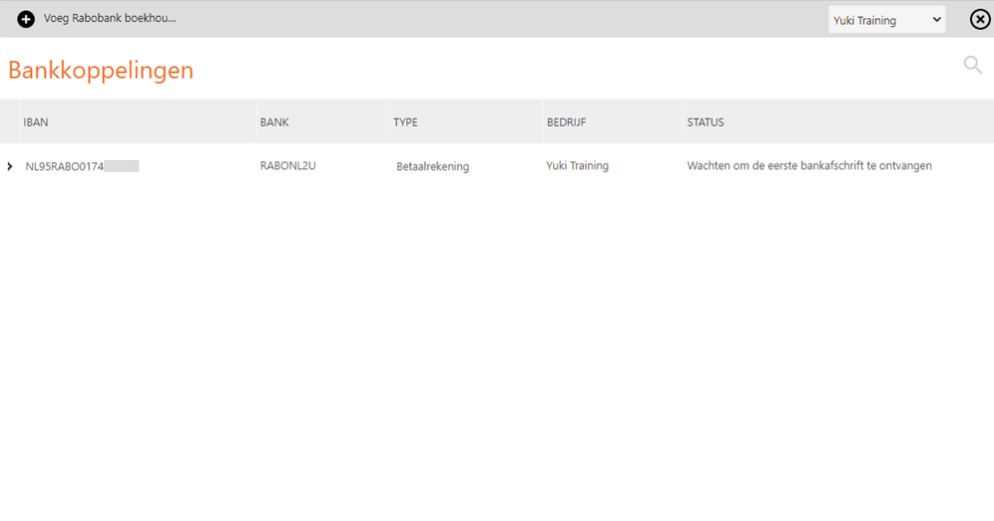
The following screen is opened:
Nmbrs Accounting automatically fills in the From date (start of the current year) and To date (to today's date). You can change these dates if required. - click on the Import button to import all transactions from the relevant Rabobank account for the specified period.
Error message "Import is not possible when the bank account is not connected"
It may happen that the bank account is among the linked bank accounts and bank transactions are retrieved through the new accounting link but the old bank transactions cannot be imported manually.
To solve this problem:
- under 'Linked Rabobank accounts', check the corresponding bank account
- click on the Disconnect button
- under 'Unlinked Rabobank accounts', check the relevant bank account again
- then click on the Link bank account button.
The old bank transactions can now be imported manually again.
Import completed
The following message appears on the screen when the import of transactions is completed:

A link to the newly imported bank file is now also shown.
TIP!
The imported bank file can now be found on the 'Files' tab of the 'Bank' folder in the Archive.
Was this article helpful?
That’s Great!
Thank you for your feedback
Sorry! We couldn't be helpful
Thank you for your feedback
Feedback sent
We appreciate your effort and will try to fix the article