Disclaimer
All screenshots in the article were taken in the Dutch version of Nmbrs Accounting.
To collect payment for your sales invoices using a SEPA direct debit file, a contact must give permission via a direct debit mandate to the beneficiary, allowing to automatically debit amounts from the (business) account on a recurring or one-time basis.
In Nmbrs Accounting, the direct debit mandate is only available for customers and not for other contact types.
Click on the Contacts icon in the navigation bar and then click on Contacts.
Open the relevant contact card and then, in the now-opened screen, click on Direct debit mandates.
The following screen is opened:

Only a user with the 'Back office' role in the domain or a user with financial rights ('Financial administration' or 'External accountant' role) or the 'Management' or 'Procuration' role can create a SEPA direct debit mandate.
For a detailed description of the various input fields of the direct debit mandate see article Create SEPA direct debit mandate.
Click on the New button in order to create a new direct debit mandate.
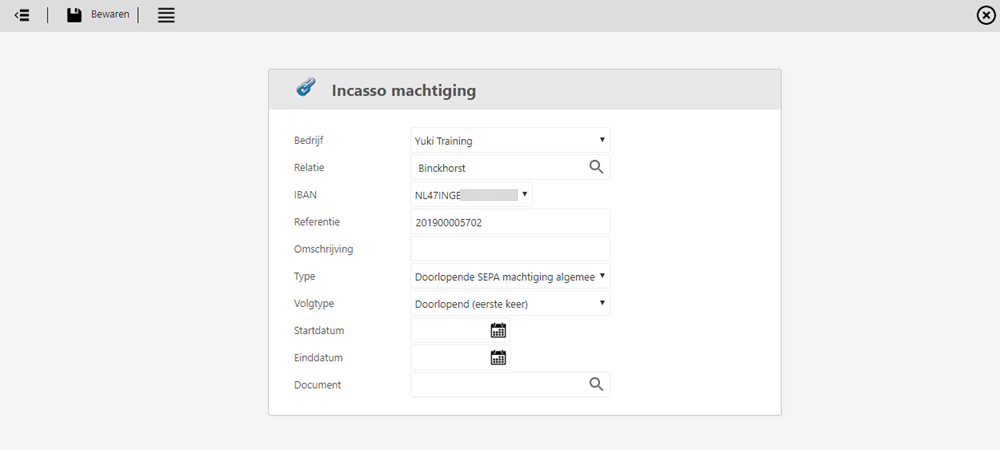
Enter the details of the new direct debit mandate and then click on the Save button.
Was this article helpful?
That’s Great!
Thank you for your feedback
Sorry! We couldn't be helpful
Thank you for your feedback
Feedback sent
We appreciate your effort and will try to fix the article