Disclaimer
All screenshots in the article were taken in the Dutch version of Nmbrs Accounting.
In Nmbrs Accounting, you can view an overview of all sales invoices that are still due for collection. These sales invoices have a valid direct debit mandate.
Once you have verified that the SEPA collector ID has been entered for your bank account and you have created all SEPA direct debit mandates in Nmbrs Accounting, you can collect all invoices via a SEPA direct debit file.
Any invoices that still require further investigation or follow-up can be marked as 'Pending'.
Click on the Bank icon on the navigation bar, click on Collect and then, in the now-opened screen, clcik on To collect.
The following screen is opened:
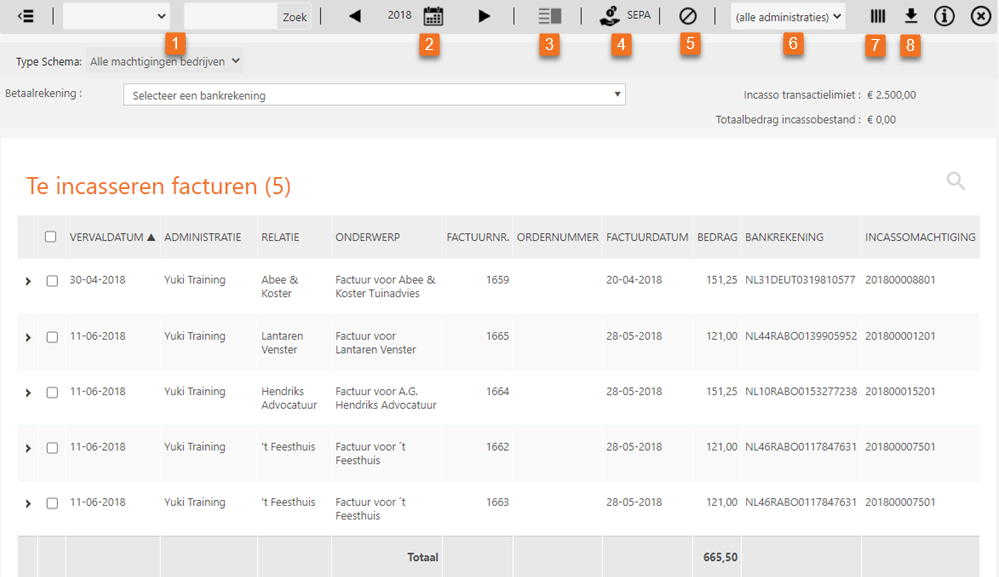
The list above of invoices still to be collected can be filtered by Scheme type:
- all mandates for businesses
- all general mandates
- no mandates: sales invoices that don't have a direct debit mandate or an invalid direct debit mandate.
In this screen you can use the following buttons or dropdown menus:
- Choose the filter that you want to apply on the invoices: Subject, Amount, Contact, Invoice number, Item, Tag, Project or Maximum amount.
Then enter the actual selection criteria.
By clicking on the Search button the filter is applied to the overview. - Select the time period for which you want to view the invoices to be collected.
- Switch between showing or hiding a preview of the selected sales invoice.
- Create a draft SEPA direct debit file from the selected invoices. All invoices will be removed from this overview and moved to the 'Payments in transit' overview.
- Mark the selected invoices as pending. These invoices will disappear from this overview and be moved to the 'In process' overview.
- Select the overview of invoices to be collected from the appropriate administration.
- Adjust the columns shown in this overview (among others the 'Received' or 'To receive' columns)
- Download the overview shown as a CSV fle (Excel).
Was this article helpful?
That’s Great!
Thank you for your feedback
Sorry! We couldn't be helpful
Thank you for your feedback
Feedback sent
We appreciate your effort and will try to fix the article