Disclaimer
All screenshots in the article were taken in the Dutch version of Nmbrs Accounting.
In a domain, you can set which user per administration will receive which messages from Nmbrs Accounting.
The messages are about the following:
- Questions about the administration
- Messages about the VAT return
- Questions about points of interest (e.g. documents that cannot be processed)
- Tasks related to pay slips.
This setting applies only when using the Nmbrs Payroll, Loket or Nmbrs Accounting payroll service.
Only a user with the ‘Management’ role or the domain owner can set the messages from Nmbrs Accounting.
To change the user who receives the messages, hover your mouse over the Settings icon on the navigation bar and then click on Messages.
The following screen is opened:
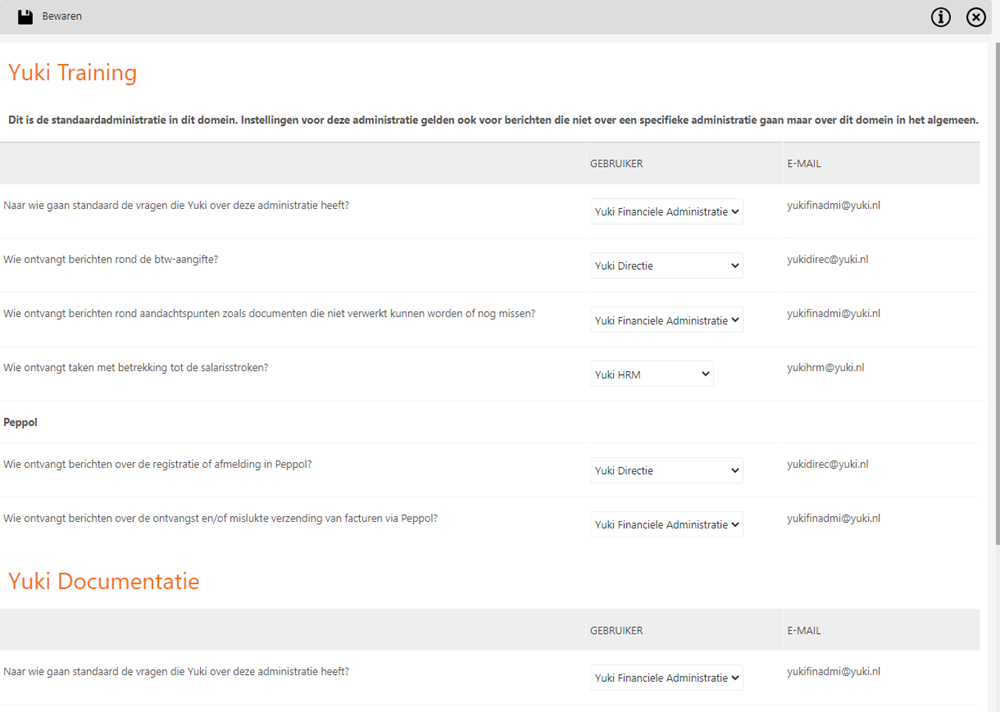
Now select the user to receive the messages from Nmbrs Accounting.
For a detailed description of setting up the messages from Nmbrs Accounting, see article Set up Messages from Nmbrs Accounting.
Was this article helpful?
That’s Great!
Thank you for your feedback
Sorry! We couldn't be helpful
Thank you for your feedback
Feedback sent
We appreciate your effort and will try to fix the article