Disclaimer
All screenshots in the article were taken in the Dutch version of Nmbrs Accounting.
When quotations, sales invoices and/or reminders are sent via Nmbrs Accounting's ‘virtual’ mail server, it happens that they end up in the customer's Spam box.
This can be resolved by giving Nmbrs Accounting explicit permission to send email from your email address. You do this by contacting your domain's hosting provider with a request to have the correct DNS records of your email account set up on their own SMTP server.
These DNS records can be found by clicking on the Settings icon in the navigation bar and then click on Sales settings in the now-opened screen. In the now-opened screen, under Invoice delivery, click on Email sending options.
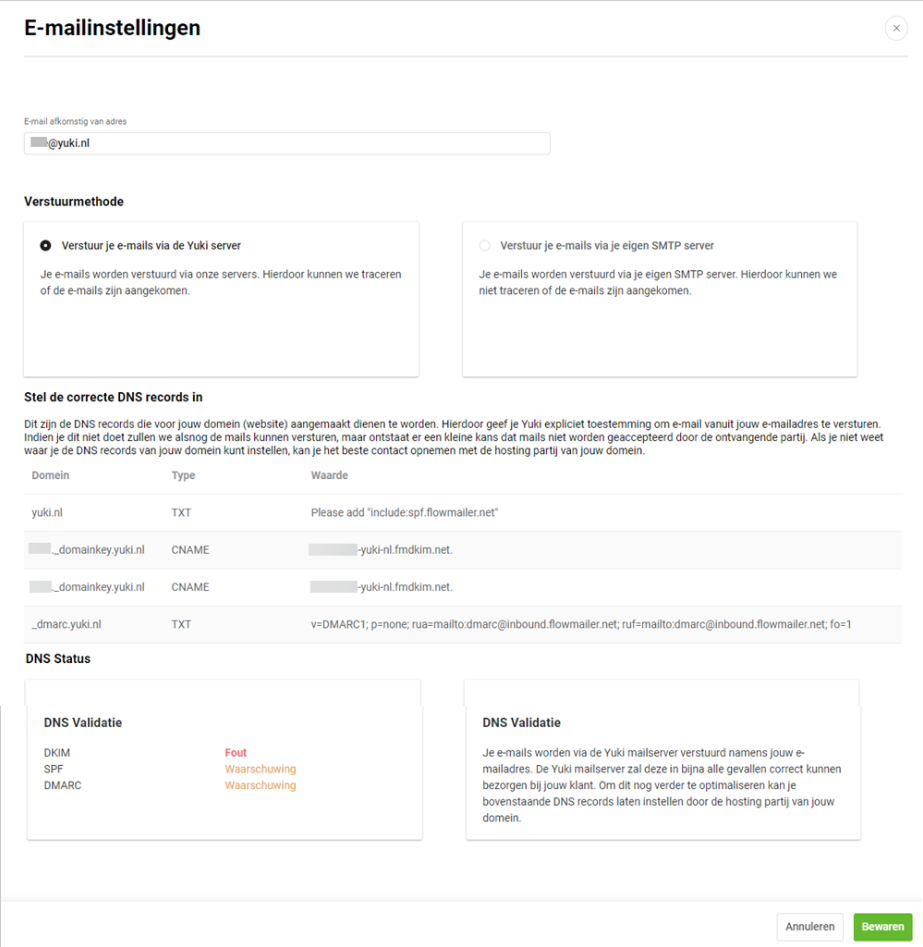
For a detailed description of sending quotations, sales invoices and/or reminders via Nmbrs Accounting's mail server, see article Email sending options (email account and mail server).
Was this article helpful?
That’s Great!
Thank you for your feedback
Sorry! We couldn't be helpful
Thank you for your feedback
Feedback sent
We appreciate your effort and will try to fix the article