Disclaimer
All screenshots in the article were taken in the Dutch version of Nmbrs Accounting.
First, you must apply for a SEPA direct debit contract with your bank in order to be authorized to collect payments. A SEPA direct debit contract specifies a number of details, including the collector ID, the type of mandates, and, if required, the maximum amount that may be collected per transaction.
The Collector ID from the SEPA direct debit contract must be added to the bank account from which you will be collecting payments in Nmbrs Accounting. It is not possible to create a SEPA Direct Debit file if the Collector ID has not been entered for the relevant bank account.
After entering the Collector ID, you create all SEPA direct debit mandates, after which you can collect payments for your sales invoices using a SEPA direct debit file.
Only a user with the ‘Back office’ role in the domain or the ‘Management’, ‘Financial administration’, ‘External accountant’, or ‘Procuration’ roles can enter a SEPA collector ID for a bank account.
Acces to bank account
To access:
- click on the Bank icon on the navigation bar
- click on Bank accounts
- then, in the now-opened screen, click on the pencil in front of the bank account.
The following screen is opened:
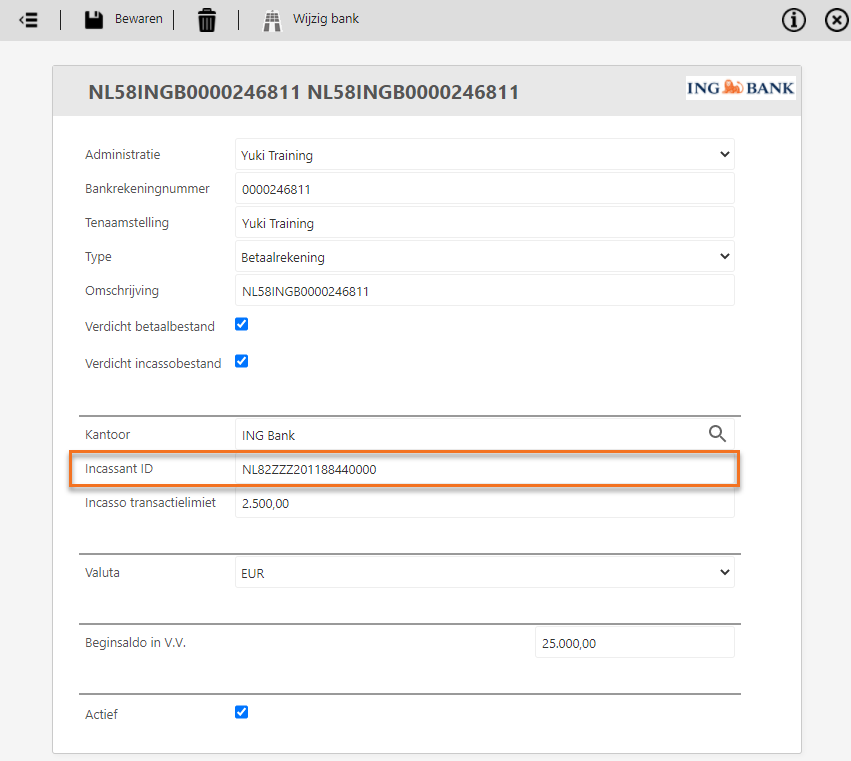
The Aggregated payment file and Aggregated colllection file fields are only availabke for an user with the 'Back office' role in the domain.
Enter the collector ID in the Collector ID field that is stated on the SEPA direct debit contract of the bank.
TIP!
In the Collection transaction limit field you can enter the maximum amount that may be collected per transaction. All invoices to be collected with an amount above this transaction limit cannot be included in a SEPA collection file.
Was this article helpful?
That’s Great!
Thank you for your feedback
Sorry! We couldn't be helpful
Thank you for your feedback
Feedback sent
We appreciate your effort and will try to fix the article