Disclaimer
All screenshots in the article were taken in the Dutch version of Nmbrs Accounting.
In Nmbrs Accounting, you manage two types of contacts: Companies and (Contact) persons, each with specific contact characteristics and linking options.
Types of contacts
- Company: can be designated as a customer, supplier, administration, or without a specific type. Companies can be linked to each other via a parent-child relationship (the “Extra” tab).
- Person: can be designated as a customer, a contact at a company, a private individual, a user in Nmbrs Accounting, or an employee.
If you link a contact to a company, that contact’s documents will be immediately visible on the contact card of the linked company.
Change contact type (Company to Person or vice versa)
To change the contact type:
- click on the Contacts icon in the navigation bar
- click on Contacts
- search for and open the relevant contact card
- click on Edit this record button
- select Person or Company from the dropdown menu
- save the change.
ATTENTION!
Contracts are not automatically updated.
Changes to personal or company information (such as email address, IBAN, direct debit authorization, or payment method) are not automatically reflected in active contracts for recurring invoices. Always update this information manually in the relevant contract.
Create and validate
Contacts can be added in several ways:
- Automatically from the central contact database or based on a scanned document
(See article Validated contact database) - Created manually, imported, or synchronized via the Contact web service.
(See article Create company (contact details), Create person (contact details), Import contacts or Contact web service)
Chamber of Commerce/VIES validation
A checkmark next to the company name indicates that the contact has been successfully verified through the Chamber of Commerce or VIES.
Available data on contact card
Example of Company contact card
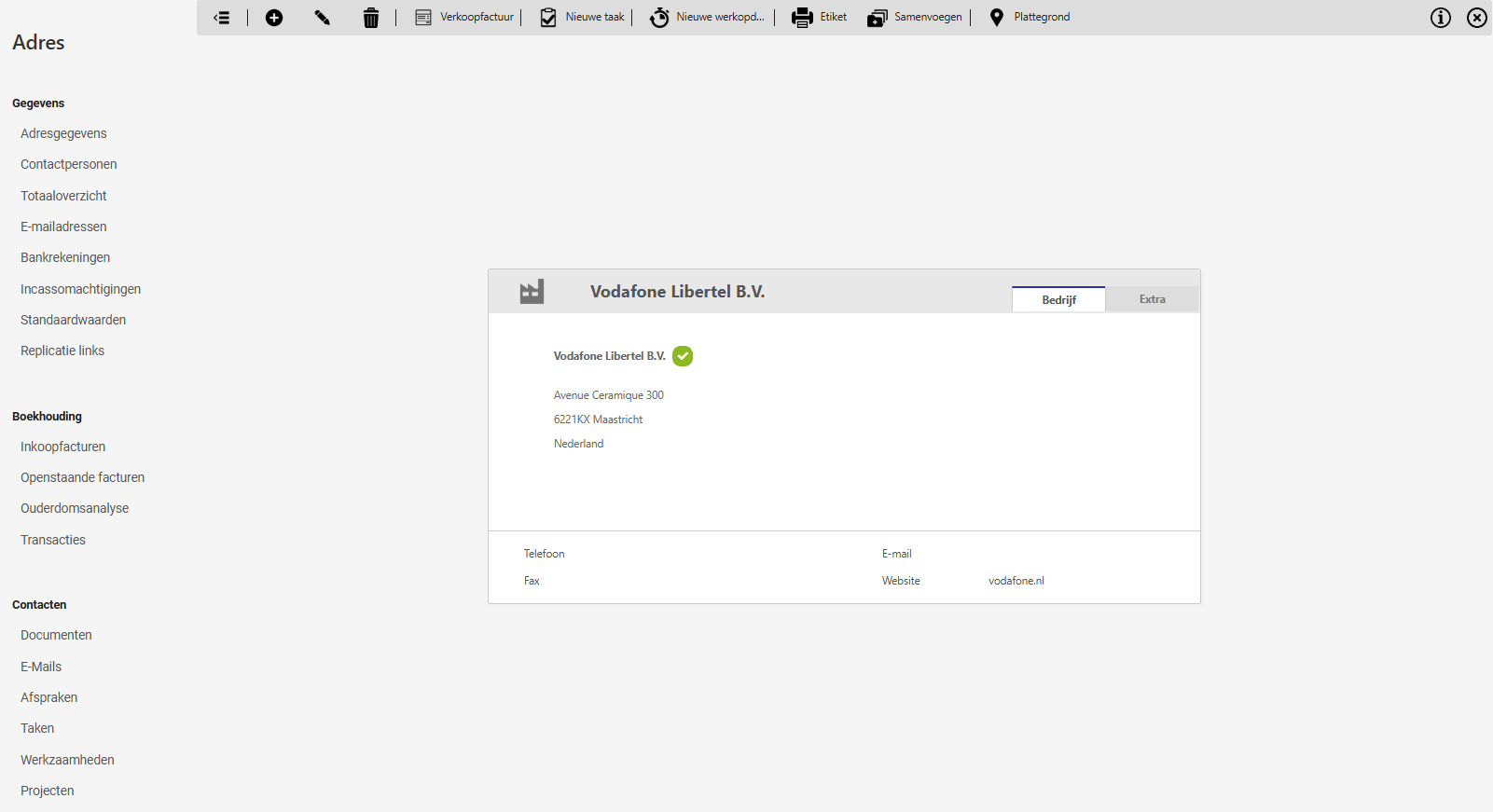
Which sections and tabs are visible on the contact card depends on your user role and the contact type.
Data
Manage and view the contact's basic information:
- Contact info
- Contact persons (visible only for contacts of the 'Company' type)
- Summary
- Email addresses
- Supplier codes (visible only for contacts of the 'Supplier' type)
- Bank accounts
- Direct debit mandates (visible only for contacts of the 'Customer' type)
- Web addresses
- Default values (available only to user with the 'Back office' or 'external accountant' role)
- Replication links (available only to user with the 'Back office' role).
Financials
Visible as soon as purchase or sales invoices are linked to the contact:
- Purchase invoices (visible only for contacts of the 'Supplier' type)
- Sales invoices (visible only for contacts of the 'Customer' type)
- Outstanding invoices
- Quotations
- Aging analysis
- Current account
- Transactions
- Price lists (visible only for contacts of the 'Customer' type)
- Price agreements (visible only for contacts of the 'Customer' type).
- Contracts.
Contacts
Overview of items linked to the contact in Nmbrs Accounting:
- Contact persons (visible only for contacts of the 'Company' type)
- Documents
- All mail
- Appointments
- Tasks
- Activities
- Projects.
Employee data
Visible when the contact is also recorded as an employee:
- HR documents
- Absence.
Was this article helpful?
That’s Great!
Thank you for your feedback
Sorry! We couldn't be helpful
Thank you for your feedback
Feedback sent
We appreciate your effort and will try to fix the article