Disclaimer
All screenshots in the article were taken in the Dutch version of Nmbrs Accounting.
With the Direct debit feature, sales invoices can be easily collected. You can select sales invoices from the 'To collect' overview, and Nmbrs Accounting will then generate a single SEPA direct debit file that you can submit to your bank. Finally, the invoices in the SEPA direct debit file will be automatically collected by the bank. The advantage of the Direct debit feature is that it is no longer necessary to enter all the data on the bank’s website.
The Direct debit feature is integrated into the Bank functionality.
The Direct debit feature is only available if a user with the ‘Management’ role has selected the Large or Unlimited bundle via the Store in the domain.
Only a user with the ‘Back office’ role in the domain or the ‘Financial administration’, ‘External accountant’, ‘Procuration’, or ‘Management’ role can use the Direct debit feature.
FOR FREQUENTLY ASKED QUESTIONS ABOUT THE DIRECT DEBIT FEATURE, SEE THE BANK FAQ!
TIP!
The collection list can be added as a shortcut on the Desktop or as a bookmark to theHome page so you can immediately check how many sales invoices still need to be collected.
Prepare for direct debit
To collect payments for sales invoices using Nmbrs Accounting, the following steps must be completed:
- enter the SEPA Collector ID in Nmbrs Accounting
(see article Enter SEPA collector ID) - create SEPA direct debit mandates in Nmbrs Accounting
(see article Create SEPA direct debit mandate) - collect payments via a SEPA direct debit file
(see article Collect Invoices via a SEPA direct debit file).
Click on the Bank icon in the navigation bar, then click on Collect. The Direct debit home screen will open. However, the screen below will only appear if a SEPA collector ID has already been entered for the bank account:
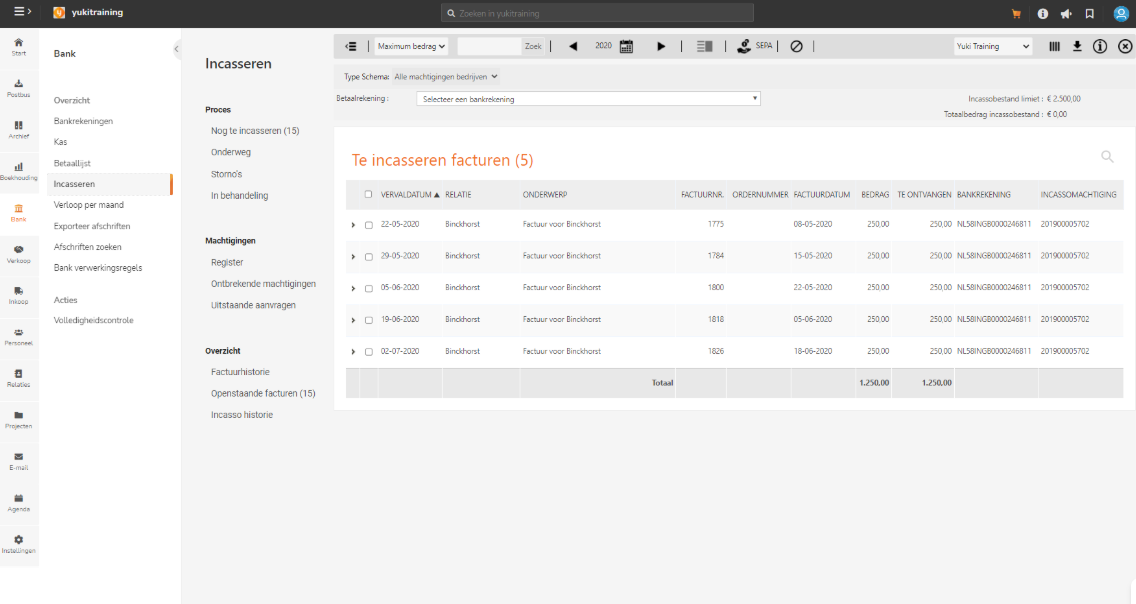
On the home screen, you'll see a submenu with the most important functions of the Direct Debit feature.
Process
To collect
Overview of all sales invoices that still have to be collected.
Payments in transit
Overview of all sales invoices for which the direct debit is still in transit. These invoices are included in a not aggregated SEPA direct debit file or a draft SEPA direct debit file and still need to be matched with a direct debit in Nmbrs Accounting.
Reverted
Overview of all sales invoices (in a final SEPA direct debit file) for which the direct debit was reversed after the amount was credited to the recipient’s account. A reversal can be initiated by the bank or by the customer.
In process
Overview of all sales invoices that have been flagged for further action. These are invoices that have not yet been collected and require further investigation or follow-up.
Mandates
Register
Overview of all direct debit mandates.
Missing mandates
Overview of all contacts (with sales invoices to be collected) without a direct debit mandate. Here you can also create a number of direct debit mandates at once.
Outstanding requests
Overview of all direct debit mandates that still need to be signed by the contact. A start date of the mandate still has to be entered.
Report
Invoice history
In this overview all sales invoices still to be collected and all sales invoices that already have been collected are shown.
Outstanding invoices
In this overview all sales invoices still to be collected are shown.
Collection history
In this overview all draft and final SEPA direct debit files are shown.
Was this article helpful?
That’s Great!
Thank you for your feedback
Sorry! We couldn't be helpful
Thank you for your feedback
Feedback sent
We appreciate your effort and will try to fix the article