Disclaimer
All screenshots in the article were taken in the Dutch version of Nmbrs Accounting.
The Reminder and demand for payment service helps you receive your money from your customers faster.
Through a well-timed and careful process of reminders and demands for payments, your invoices are brought to your customers' attention more often in a customer-friendly way. The dunning process is largely monitored and automated by Nmbrs Accounting and requires no direct user actions.
This service also allows you to block automatic sending of reminders and demands for payment letters to one or more customers.
To make sure that Nmbrs Accounting automatically sends letters (reminders and demands for payment) to your customers, the following things need to be taken care of:
- activate reminder and demand for payment service
- define the deadlines for payment notification, reminder, demand for payment and formal notice
- check and change texts and reminder layouts of letters
- block automatic sending of reminders and demands for payment:
TIP!
You can see at any time in a test report which reminders have been sent automatically or are about to be sent.
For a detailed description see article Check reminder and demand for payment service report.
Access to Reminder and demand for payment service
To access:
- click on the Settings icon in the navigation bar
- in the now-opened screen, in the Sales section click on Reminder settings
- then click on the Automated reminders tab.
Set automated reminders
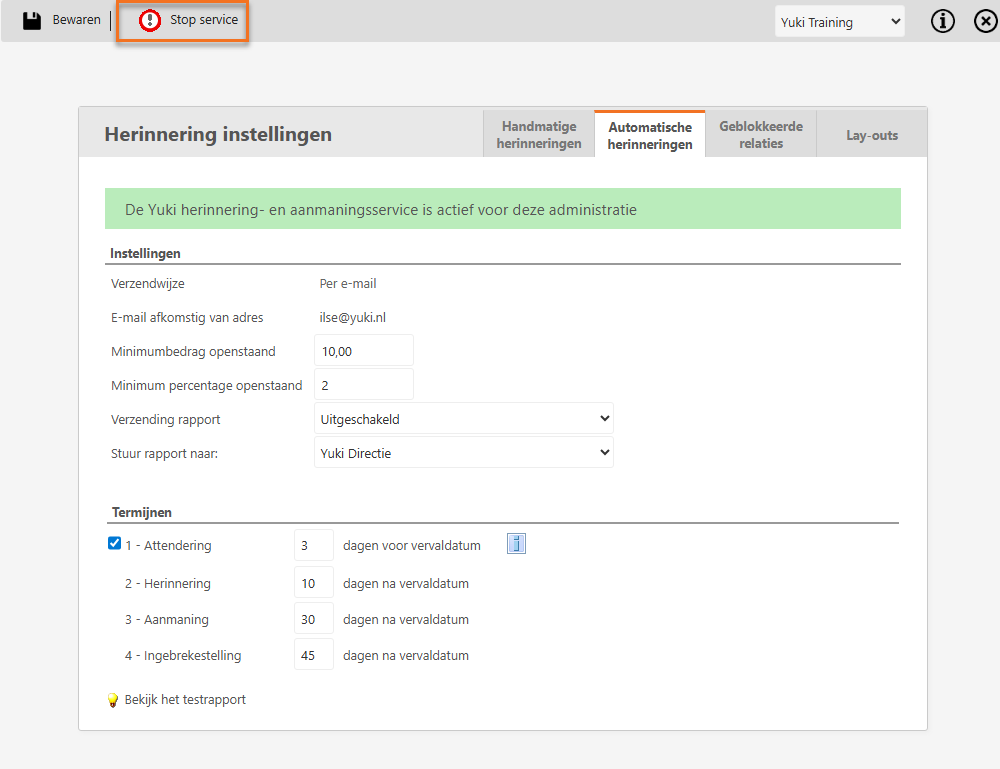
On this tab, you enter a number of settings and set the terms for reminders and demands for payment letters to be sent automatically by Nmbrs Accounting.
TIP!
The reminder and demand for payment service can always be stopped by clicking on the Stop service button.
Only a user with the ‘Management’ role can stop this service.
Settings
Email from address
Enter the e-mail address from which the reminders and demands for payment should be sent. In practice, the customer will sometimes want to respond to the reminder by sending a reply to the e-mail. So make sure that the mailbox of the e-mail address is regularly consulted.
Minimum amount outstanding
To prevent reminders/dunning letters being sent for amounts that are too small, you can enter the minimum amount here.
ATTENTION!
If no minimum amount outstanding is entered, a reminder/dunning letter will always be sent.
Minimum percentage outstanding
To prevent small payment differences leading to reminders/dunning letters you can also enter a percentage. If, for example, you enter 2%, no reminder/dunning letter will be sent for an invoice of 1000 Euros of which less than 20 Euros still have to be paid.
ATTENTION!
If no minimum percentage is entered, a reminder/dunning letter will always be sent.
Sending report
Indicate whether a report should be sent. If yes, should this report be sent daily or weekly.
Send report to:
You will be kept informed by Nmbrs Accounting about the letters sent and for which invoices no letters were sent. Here you can specify which user Nmbrs Accounting should send this report to.
Terms
Up to four letters (by e-mail) are sent per invoice:
- 1 - Payment notification
This is sent by default 3 days before the due date of the invoice. Its purpose is to bring the invoice to the customer's attention once again and to indicate that the due date is about to expire.
Sending an alert can be disabled. - 2 - Reminder
By default, this is sent 10 days after the due date. - 3 - Demand for payment
This is sent by default 30 days after the due date. - 4 - Formal notice
This is sent by default 45 days after the due date.
The number of days of a term can be changed manually.
If the customer has still not paid after 60 days, it is advisable to transfer the claim to a collection agency!
Was this article helpful?
That’s Great!
Thank you for your feedback
Sorry! We couldn't be helpful
Thank you for your feedback
Feedback sent
We appreciate your effort and will try to fix the article