Disclaimer
All screenshots in the article were taken in the Dutch version of Yuki.
It is possible in Sales Standard to send a sales invoice to one default additional email address (CC).
Additionally, additional email addresses can be added in the CC field during invoice creation.
Send sales invoice to standard additional email address (CC)
This default additional email address must be entered in the customer's contact card:
- hover your mouse over the Contacts icon in the navigation bar
- search and then open the customer's contact card
- click on Email addresses on the left side of the screen.
The following screen is opened: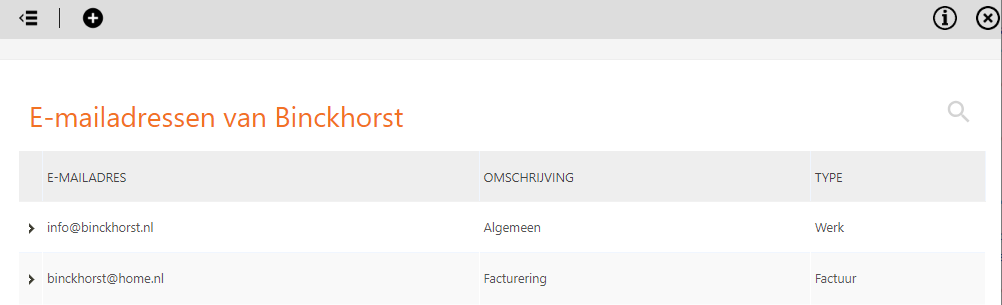
- then create a new email address by clicking on the button with the plus sign
- with this new e-mail address, specify that the type is Invoice copy
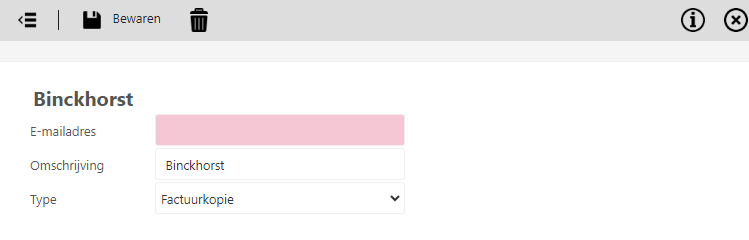
- click on the Save button to save the default addiotional (invoice) email address.
The next time a sales invoice is sent to this customer a copy sales invoice will also be sent to the e-mail address (with the type ‘Invoice copy’).
For a detailed description of email addresses for sending sales invoices see article Email addresses for sending sales invoices.
Was this article helpful?
That’s Great!
Thank you for your feedback
Sorry! We couldn't be helpful
Thank you for your feedback
Feedback sent
We appreciate your effort and will try to fix the article