Disclaimer
All screenshots in the article were taken in the Dutch version of Nmbrs Accounting.
Individuals are contacts in Nmbrs Accounting at companies, customers (individuals), private persons, users in Nmbrs Accounting or employee and may or may not be in the personal address book.
A newly created contact will be linked directly to the company for whom the invoice is intended.
Businesses can be customers, suppliers or nothing in Nmbrs Accounting and may or may not be in the personal address book.
Create customer
To create a customer, go through the following steps:
- in an opened invoice, click in the Customer field
- select + New contact from the dropdown menu.
- then, in the now-opened screen behind the Type field, click on the Business or Private person radio button to add a new contact of type ‘Private person’ or ‘Business’ respectively.
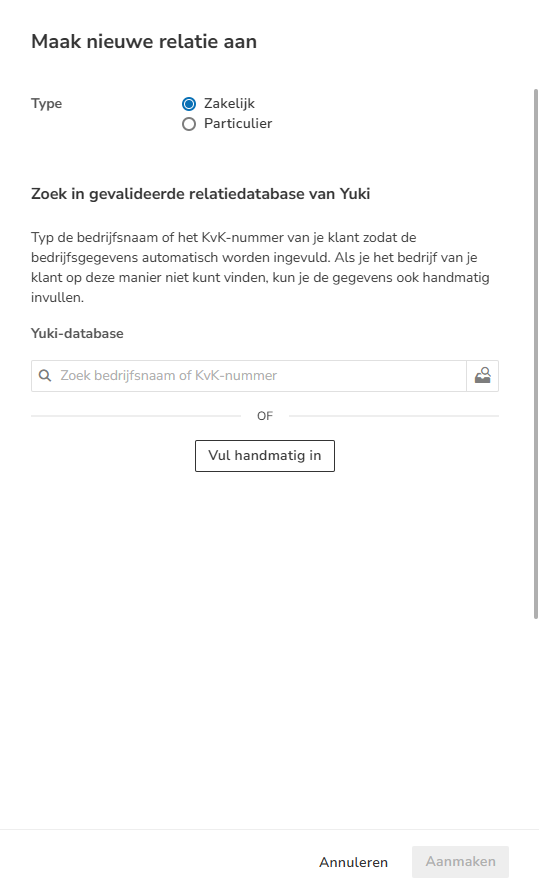
A new contact can be created in two ways:
- search for the contact in Nmbrs Accounting's validated contact database
- enter the Business or Private person's details manually.
Search contact in validated contact database
Type your customer's company name or Chamber of Commerce number so that the company information is filled in automatically. If you can't find your customer's company this way, you can also enter the data manually.
Enter contact details manually
The initial contact details of the business or private person should be recorded and added or changed later if necessary:
General details:
- Name (required)
- Address:
- Street + house number
- Postal code + city
- Country (required).
Financial details (only available for business type):
- CoC number
- VAT number
- Contact code
- OIN number (only available when ‘Netherlands’ country is selected for the address)
- GLN (a globally unique 13-digit identification number that can be used to identify a specific location or department of a company)
Invoicing information:
- Invoicing email
The customer email address to be used to send sales invoices via email. - Default settings
The use of default invoicing settings is enabled by default.
Customer specific sales settings
If you disable the use of default invoicing settings, you can enter the following customer-specific sales settings:
- Sending method:
- Send manually
- Peppol.
- Invoice language:
- Dutch
- English
- French.
After you fill in all the details of the business or private person, click on the Create button which will create the business or private person as a contact in Nmbrs Accounting's address book.
Was this article helpful?
That’s Great!
Thank you for your feedback
Sorry! We couldn't be helpful
Thank you for your feedback
Feedback sent
We appreciate your effort and will try to fix the article