Disclaimer
All screenshots in the article were taken in the Dutch version of Nmbrs Accounting.
In Nmbrs Accounting, you can view an overview of all sales items created in the administration of your domain.
Access to All sales items
To access;
- click on the Sales icon in the navigation bar
- click on Sales items
- then, in the now-opened screen. select All sales items from the dropdown menu.
All sales items overview
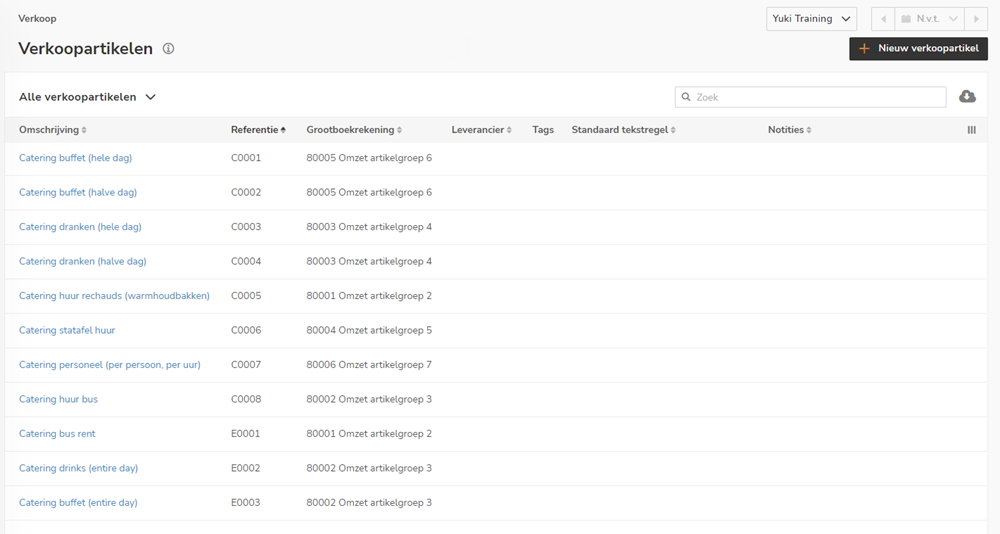
On this screen, you can see all the details for all the sales items that have been created.
AVAILABLE USER ACTIONS
From this overview, a user can:
- view the total overview of a sales item.
View total overview of sales item
To view the total overview of a sales item:
- hover your mouse over the line of the relevant sales item
- click on the button with the three dots
- then select the View sales item menu option from the dropdown menu
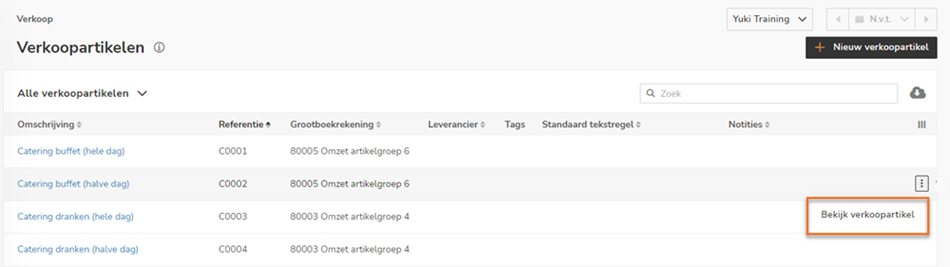
In the now-opened screen, a so-called total overview of the sales item can be viewed.
The following items, among others, are displayed here: details of the sales item, price list(s) to which the sales item has been added, price agreement(s) with customers for the sales item, key figures for the sales item, revenue per month, revenue per year, last invoices and top sales.
For a detailed description, see article Total overview of sales item.
Was this article helpful?
That’s Great!
Thank you for your feedback
Sorry! We couldn't be helpful
Thank you for your feedback
Feedback sent
We appreciate your effort and will try to fix the article