Disclaimer
All screenshots in the article were taken in the Dutch version of Nmbrs Accounting.
In Nmbrs Accounting you can view the total sales in a given period per project in the sales list. This concerns the invoiced amounts (revenue) of all sales invoices processed and sent in Nmbrs Accounting that are linked to a project.
ATTENTION!
This report is only available if a user with the 'Management' role has selected the Medium, Large or Unlimited bundle via the Store in the domain.
Access to Invoiced revenue per project
To access:
- click on the Sales icon in the navigation bar
- click on Reports
- then, in the now-opened screen, select Invoiced revenue per project.
Invoiced revenue per project report
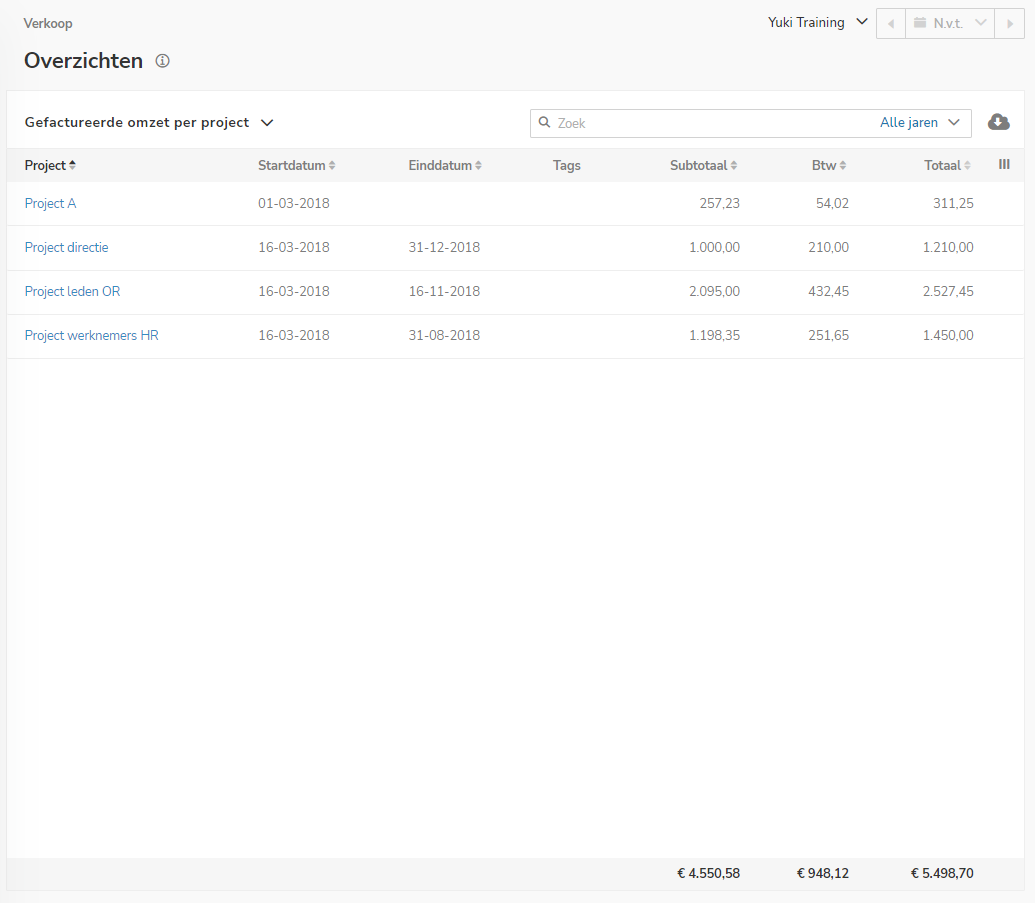
On this screen, you can view all the details of total sales for a specific period, broken down by project.
Search data
The search bar can be used to search for:
- (part of a) name
The search result now shows all data in which this name has been entered in, for example, the 'Description', 'Subject', 'Name', 'Company name' or 'Contact' field. - number
The search result now shows all data where the number is entered in, for example, the 'Description', 'Subject', 'Name', 'Company name' or in a numeric field such as 'Invoice number'. - amount
You can search for an exact amount by entering this amount in the search field, for example, '54,45' or '54.45'. - date
You can search for a specific date by entering it as:- 31/08/2020
- 31-08-2020
- 310820
- 31082020.
Targeted search
You can also perform a targeted search using different search terms. After each search, the search result can be further specified by adding a new search term.
Was this article helpful?
That’s Great!
Thank you for your feedback
Sorry! We couldn't be helpful
Thank you for your feedback
Feedback sent
We appreciate your effort and will try to fix the article