Error messages Nmbrs Payroll link

Modified on Mon, 31 Aug at 3:56 PM

Disclaimer

All screenshots in the article were taken in the Dutch version of Nmbrs Accounting.


If there are probIems in one or more domains within the portal with the import of salary documents via the Nmbrs Payroll link, a task will be assigned automatically in the portal to each portal administrator. 


The task has the name Payroll Update meldingen


When you open the task you will find the notification of the problem under Description.
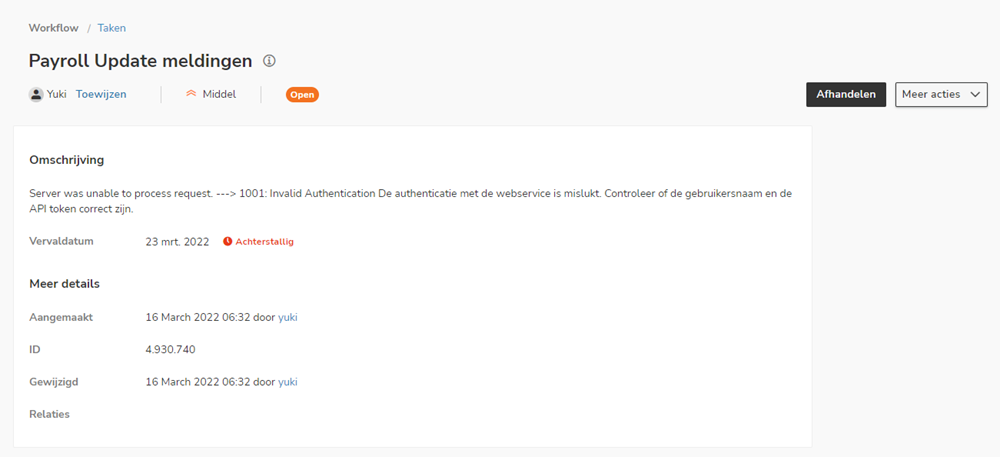


A portal administrator can address the 'task' or assign it to an employee in the office. 


Known error messages and solutions
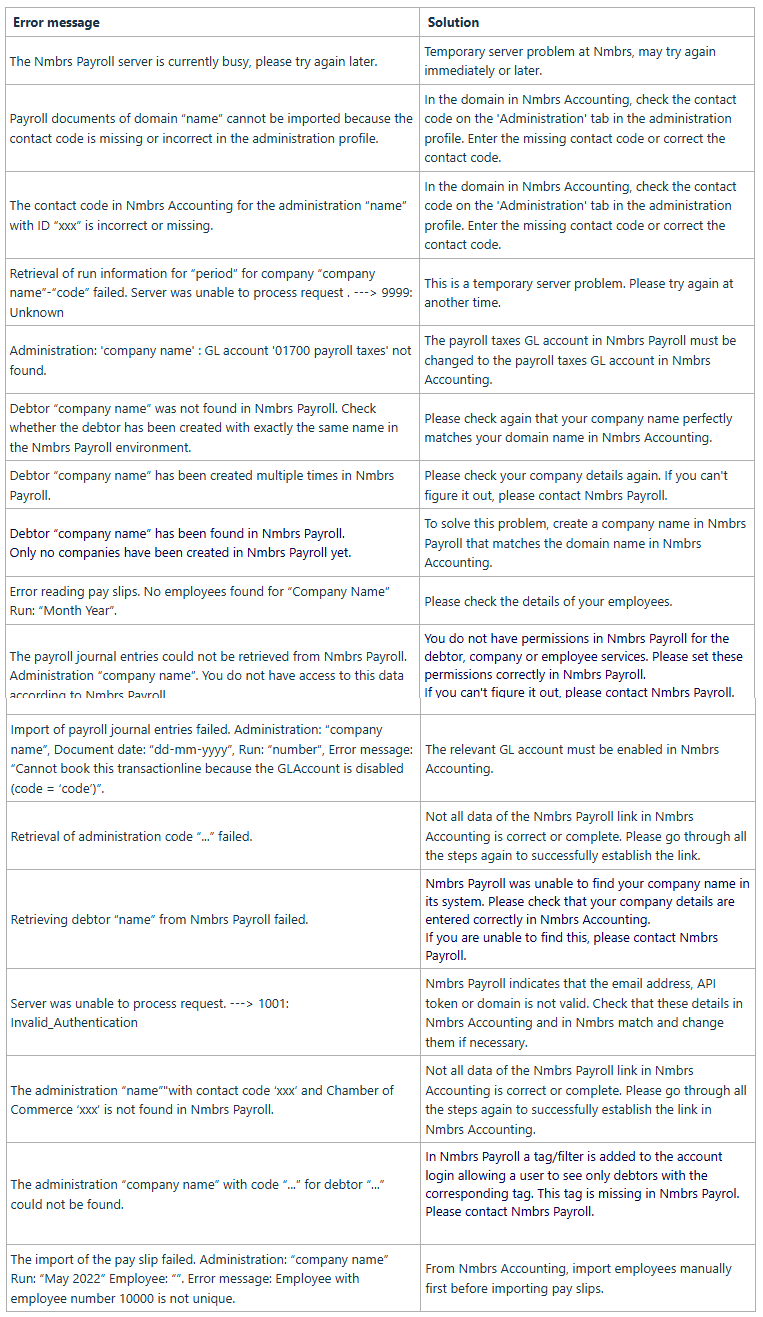


 Error message Solution
The Nmbrs Payroll server is currently busy, please try again later.
Temporary server problem at Nmbrs, may try again immediately or later.
Payroll documents of domain “name” cannot be imported because the contact code is missing or incorrect in the administration profile.
In the domain in Nmbrs Accounting, check the contact code on the 'Administration' tab in the administration profile. Enter the missing contact code or correct the contact code.
The contact code in Nmbrs Accounting for the administration “name” with ID “xxx” is incorrect or missing.
In the domain in Nmbrs Accounting, check the contact code on the 'Administration' tab in the administration profile. Enter the missing contact code or correct the contact code.
Retrieval of run information for “period” for company “company name”-“code” failed. Server was unable to process request . ---> 9999: Unknown
This is a temporary server problem. Please try again at another time.
Administration: 'company name' : GL account '01700 payroll taxes' not found.The payroll taxes GL account in Nmbrs Payroll must be changed to the payroll taxes GL account in Nmbrs Accounting.
Debtor “company name” was not found in Nmbrs Payroll. Check whether the debtor has been created with exactly the same name in the Nmbrs Payroll environment.Please check again that your company name perfectly matches your domain name in Nmbrs Accounting.
Debtor “company name” has been created multiple times in Nmbrs Payroll.Please check your company details again. If you can't figure it out, please contact Nmbrs Payroll.

Debtor “company name” has been found in Nmbrs Payroll.

Only no companies have been created in Nmbrs Payroll yet.

To solve this problem, create a company name in Nmbrs Payroll that matches the domain name in Nmbrs Accounting.
Error reading pay slips. No employees found for “Company Name” Run: “Month Year”.Please check the details of your employees.
The payroll journal entries could not be retrieved from Nmbrs Payroll. Administration “company name”. You do not have access to this data according to Nmbrs Payroll.

You do not have permissions in Nmbrs Payroll for the debtor, company or employee services. Please set these permissions correctly in Nmbrs Payroll.

If you can't figure it out, please contact Nmbrs Payroll.


Import of payroll journal entries failed. Administration: “company name”, Document date: “dd-mm-yyyy”, Run: “number”, Error message: “Cannot book this transactionline because the GLAccount is disabled (code = ‘code’)”.
The relevant GL account must be enabled in Nmbrs Accounting.
Retrieval of administration code “...” failed.Not all data of the Nmbrs Payroll link in Nmbrs Accounting is correct or complete. Please go through all the steps again to successfully establish the link.
Retrieving debtor “name” from Nmbrs Payroll failed.

Nmbrs Payroll was unable to find your company name in its system. Please check that your company details are entered correctly in Nmbrs Accounting.

If you are unable to find this, please contact Nmbrs Payroll.

Server was unable to process request. ---> 1001: Invalid_AuthenticationNmbrs Payroll indicates that the email address, API token or domain is not valid. Check that these details in Nmbrs Accounting and in Nmbrs match and change them if necessary.
The administration “name”"with contact code ‘xxx’ and Chamber of Commerce ‘xxx’ is not found in Nmbrs Payroll.
Not all data of the Nmbrs Payroll link in Nmbrs Accounting is correct or complete. Please go through all the steps again to successfully establish the link in Nmbrs Accounting.
The administration “company name” with code “...” for debtor “...” could not be found.

In Nmbrs Payroll a tag/filter is added to the account login allowing a user to see only debtors with the corresponding tag. This tag is missing in Nmbrs Payrol.

Please contact Nmbrs Payroll.

 
The import of the pay slip failed. Administration: “company name” Run: “May 2022” Employee: “”. Error message: Employee with employee number 10000 is not unique.
From Nmbrs Accounting, import employees manually first before importing pay slips.


If you have questions about other error messages, please contact the Nmbrs Accounting Support team.


Was this article helpful?

That’s Great!

Thank you for your feedback

Sorry! We couldn't be helpful

Thank you for your feedback

Let us know how can we improve this article!

Select at least one of the reasons
CAPTCHA verification is required.

Feedback sent

We appreciate your effort and will try to fix the article