Disclaimer
All screenshots in the article were taken in the Dutch version of Nmbrs Accounting.
In Nmbrs Accounting, it is possible to create English or French sales invoices and reminders and/or demands for payment and then send them manually to your customers.
To create a (recurring) sales invoice in a foreign language, complete the following steps:
- Translate sales invoice description
- Check the text of the email template in the foreign language and, if required, change it when the invoice is sent via email.
- Translate 'Heading' field for contact (if placeholder [heading] is used in text of email)
- Select English or French as the language when creating the sales invoice.
Access to sales item
To access:
- hover your mouse over the Sales icon in the navigation bar
- click on Sales Items
- in the now-opened screen, click on the description of the item whose description you want to translate.
Translate description of sales item
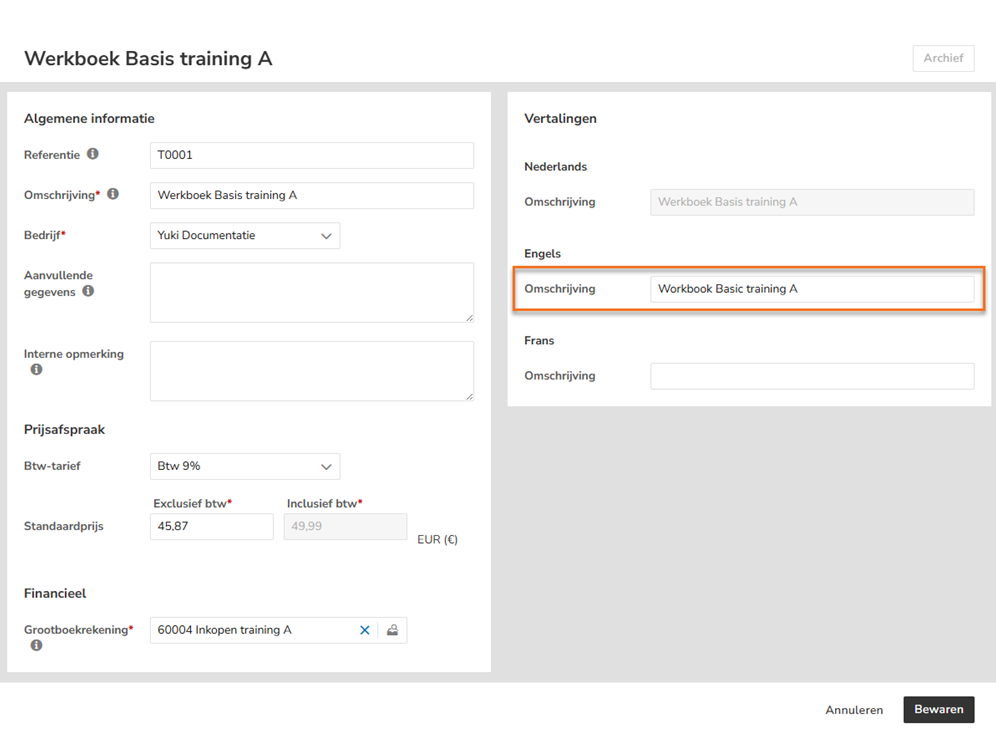
The description is the description of the sales item that will be shown on the invoice. The description can still be changed during invoice creation.
The translation of the description of the sales item can be entered in the ‘Description’ field under the relevant foreign language.
After entering the translation, click on the Save button to save the translation.
Was this article helpful?
That’s Great!
Thank you for your feedback
Sorry! We couldn't be helpful
Thank you for your feedback
Feedback sent
We appreciate your effort and will try to fix the article