Disclaimer
All screenshots in the article were taken in the Dutch version of Nmbrs Accounting.
All invoices included in a final SEPA payment file are marked 'Paid' by Nmbrs Accounting.
However, in some situations, it happens that an invoice needs to be made payable again.
Example
An example is a reverted collection of an invoice from a final SEPA payment file. The reverted collection has been booked against the payment in Nmbrs Accounting. The invoice in question is no longer in the payment list but can be found if you select the 'Payments in transit' work list.
However, the invoice is still part of the final SEPA payment file. To make the invoice payable again::
- click on the Purchase icon in the navigation bar
- in the now-opened screen, click on Payments in transit
- select the invoice in question
- then click on Mark as to be paid at the top of the screen.
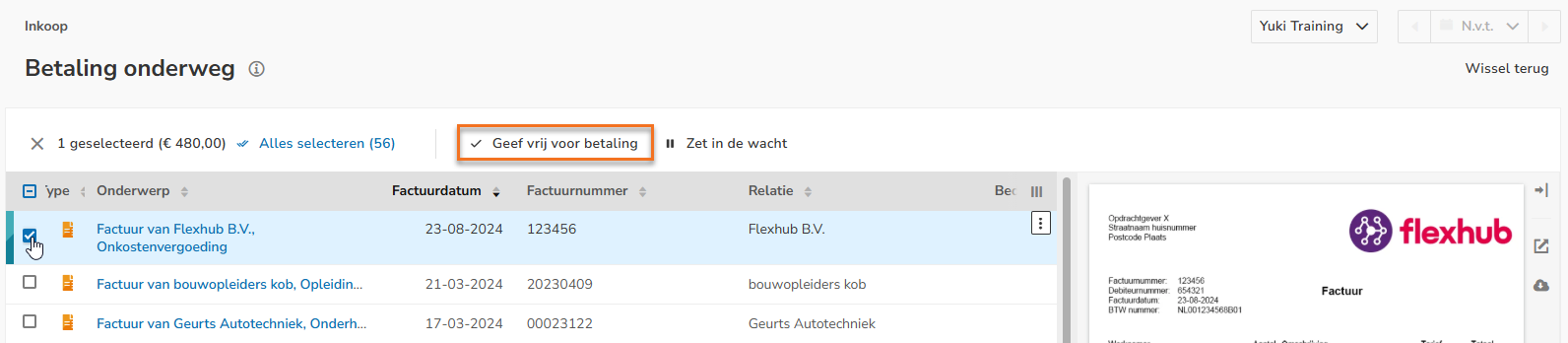
The invoice reappears in the payment list and can be found in the 'To be paid' work list.
The invoice can then be selected again to be included in a new SEPA payment file.
Was this article helpful?
That’s Great!
Thank you for your feedback
Sorry! We couldn't be helpful
Thank you for your feedback
Feedback sent
We appreciate your effort and will try to fix the article