Disclaimer
All screenshots in the article were taken in the Dutch version of Nmbrs Accounting.
As long as you yourself have not yet generated the first invoice or Nmbrs Accounting has not yet prepared the first recurring invoice, all contract data (contract details, invoice details and invoice lines) except the contact can be changed, if necessary.
For a detailed description of how to change contract details, see article Change contract of recurring invoice.
Restriction after the first recurring invoice is created
However, once you have manually generated a first recurring invoice immediately or Nmbrs Accounting has prepared the first recurring invoice, the set frequency of the recurring invoice can no longer be changed.
Access to Current contract
To access:
- click on the Sales icon in the navigation bar
- click on Contracts
- then, in the now-opened screen, select the Current contracts overview from the dropdown menu.
Change frequency
To change the frequency of a recurring invoice:
- end the current contract (see article End contract of recurring invoice)
- create a new contract by opening the recurring invoice whose frequency you want to change and then click on the Generate contract button.
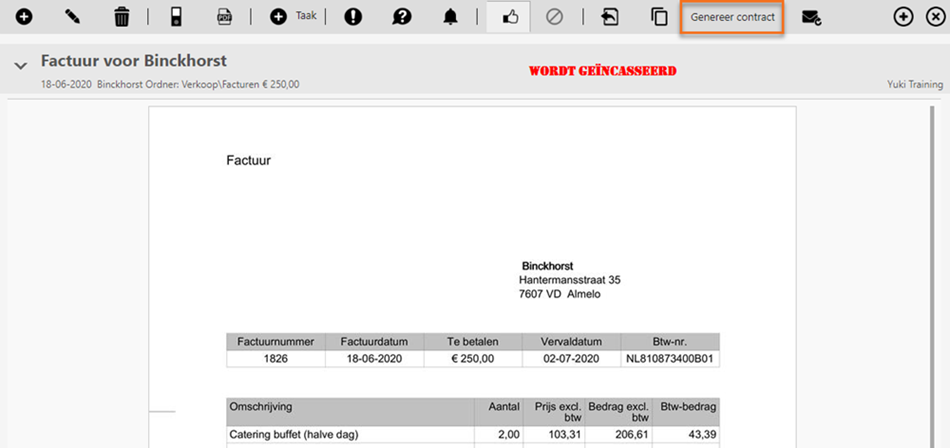
All data from the recurring invoice contract will be carried over into the newly generated contract. - in the newly generated contract, set the correct frequency of the recurring invoice.
- save the new contract.
Was this article helpful?
That’s Great!
Thank you for your feedback
Sorry! We couldn't be helpful
Thank you for your feedback
Feedback sent
We appreciate your effort and will try to fix the article