Disclaimer
All screenshots in the article were taken in the Dutch version of Nmbrs Accounting.
Depending on the size of your company and the required functionality, you can choose a suitable bundle or add extra features in the Store. The costs for this are invoiced directly to the entrepreneur by Nmbrs Accounting.
FOR FREQUENTLY ASKED QUESTIONS ABOUT BUNDLES IN NMBRS ACCOUNTING SEE BUNDLES FAQ!
Permissions and roles
Only users with the 'Management' role can choose bundles, upgrade, or add extra features.
Minimal Bundle (free)
The Minimal bundle is completely free and is not billed to the entrepreneur. This version offers basic functionality to view your administration
.
What is included in the Minimal bundle?
During the trial, you have access to the following features:
- Unlimited number of invoices: purchase invoices, sales invoices, and expense claims (from employees).
- 1 User: a maximum of one user has access to the domain.
- Communication with accountant (PO Box): submitting files (documents and transactions), viewing points of attention in the administration, and asking questions.
- Document archive (Archive): digital storage of your documents
Financial monitor (Limited): you can view data in the Financial monitor, but it is not possible to zoom in further on this data.
- Peppol: receive invoices digitally via the secure Peppol network.
TIP!
Do you want more than one user to have access to the domain? Then, after or during the trial, choose the Medium or Large bundle. These include the option to add extra users.
You can find a detailed description of the above features in the Store (via the 'Features' link at the top of the screen).
Activate bundles and features via the Store
As a user with the 'Management' role, you can independently upgrade to a larger bundle or add the Time Tracking feature via the Store:
- Small bundle (Downgrade): contains the same features as the trial, limited to a maximum of 75 invoices per month.
- Medium bundle (Upgrade): contains more features than the trial, limited to a maximum of 125 invoices per month
- Large bundle (Upgrade): contains all features, limited to a maximum of 200 invoices per month.
- Unlimited bundle (Upgrade): contains all features, unlimited number of invoices per month
- Hour registration feature: available in bundles Small, Medium, Large, and Unlimited. With this, employees register billable hours, and you can immediately create sales invoices upon approval.
After selecting your chosen bundle (upgrade) and/or extra feature(s), it is immediately available for use in your domain!
All users with the 'Management' role in your domain will receive an email about this.
Features that your accountant/administrative office can activate
Some advanced features can only be added by your accountant via the contract:
- Foreign currency: creating or submitting invoices in foreign currency, importing foreign currency bank accounts
- WKR (Work-related costs scheme): work-related expenses (cost type and VAT percentage) are automatically included in the WKR tool during accounting processing and displayed using a clear interim report (summary).
- Payroll links: Loket and Nmbrs.
- Bank links: Rabobank, ABN AMRO, ING, Knab, and Ponto PSD2.
- Web services (API):
- Web Service (from 1,000 - max. 5,000 calls/day)
- Web Service Extended (from 5,000 - max. 10,000 calls/day)
- Sales Webservice (up to 1,000 calls/day, only for Minimal bundle)
Fully automatically retrieve sales invoices processed in an external program, after which these invoices are automatically processed in Nmbrs Accounting.
How do you open the Store?
You can open the Store from any screen in your domain in two ways:
- Click on the Switch domain icon in the navigation bar at the top and choose Upgrade my bundle.
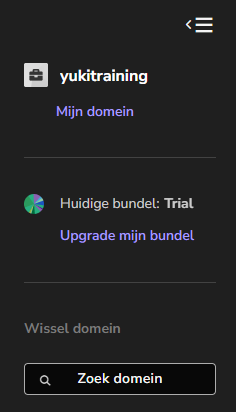
- Click directly on the shopping cart icon in the top right of your screen.

Activate bundle
To order a bundle:
- click on Buy now next to the required bundle under Subscription bundle plans
- add extra features if required on the next screen.
- click on Checkout and confirm the order.
The upgrade is active immediately!
TIP!
Not sure which bundle suits you? Click on the Calculate yourself link in the Store. This advice tool calculates the ideal bundle and the associated costs based on your input.
For a detailed description of the Store, see article Store.
Change bundle or remove extra features
You can flexibly change the chosen bundle or extra features at any time via the Store.
All users with the 'Management' role will receive an email notification for every change.
Important regarding downgrades
Are you switching to a smaller bundle (downgrade) or removing an active extra feature?
- The current larger bundle or the extra feature will remain available until the end of the current calendar month.
- The change and any rate adjustment will only take effect on the first day of the new month.
Was this article helpful?
That’s Great!
Thank you for your feedback
Sorry! We couldn't be helpful
Thank you for your feedback
Feedback sent
We appreciate your effort and will try to fix the article